
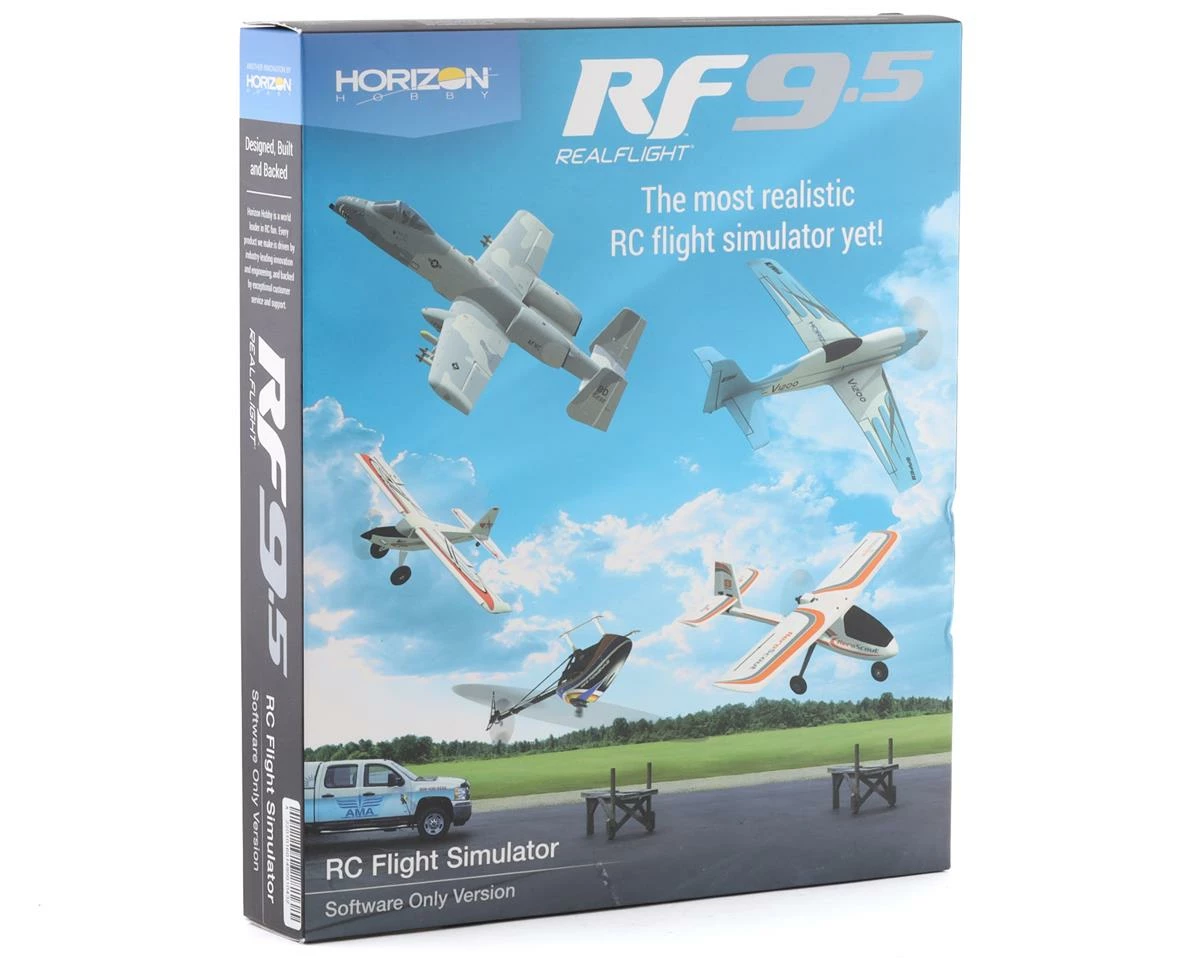
Budget 🛒 RealFlight 9.5 Flight Simulator (Software Only) ❤️
Original price was: $99.99.$69.00Current price is: $69.00.
- Peace of Mind with Every Purchase
- Product guarantee 100% satisfaction
- Reliable Payments for Reliable Shopping
- Discover a world of quality products.

The RealFlight 9.5 Flight Simulator adds more exciting features to the worlds leading RC flight simulator. RF9.5 includes over a dozen new aircraft, AMA Flying Site 3, and additional Virtual Flight Instructor lessons!
RealFlight is the best tool new RC pilots can use when learning how to fly. It also makes it possible for experienced RC pilots to practice new maneuvers and to hone their skills so they can become even better pilots.
With more than 170 different aircraft to fly — including airplanes, helicopters, drones and more — at over 40 different flying sites, plus the ability to edit aircraft and sites, there’s an almost infinite number of flying options available. Add in game-like challenges that make flight training fun, multiplayer options so you can fly and compete with other pilots online, compatibility with VR headsets, and many, many more features, and you have everything you need to succeed at the field — because you can “fly” on a desktop at home, or on a laptop just about anywhere else!
RealFlight 9.5 adds more of the most popular aircraft from the Best Brands in RC, along with the AMA Headquarters’ International Aeromodeling Center (IAC) Flying Site 3 and additional Virtual Flight Instructor lessons, to deliver an experience you simply can’t find anywhere else. It’s also available with the Spektrum® InterLink® DX simulator controller modeled after Spektrum transmitters including all standard switch locations and functions so it works just like your favorite radio!
- More than a dozen new aircraft including trainers, scale, sport, jet and heli models from E-flite, HobbyZone, Hangar 9, and Synergy
- Fly at the newest PhotoField™ – Flying Site 3 at the AMA Headquarters’ International Aeromodeling Center (IAC)
- Additional Virtual Flight Instructor lessons for new pilots learning to fly
- Additional RealFlight® Features
- Industry-leading True-To-Life™ physics that make every flight more lifelike than any other sim
- A simple and intuitive interface for zero learning curve, zero hassle, and more fun
- More than 170 aircraft including airplanes, helicopters, drones, and more
- Over 40 different flying sites including 3D fields and PhotoFields
- FlexiField™ Site Editor so you can make fields your own
- The ability to edit aircraft and to import custom aircraft
- Game-like challenges that make flight training fun and interactive
- Multiplayer options so you can fly or compete with other pilots online
- Compatible with VR headsets, including the Oculus™ Rift and HTC® Vive™ VR headsets (sold separately)
- Works with Spektrum® wireless simulator dongles for use with compatible DSM2/DSMX equipped transmitters (sold separately)
System Requirements:
- Minimum Recommended System*
- Windows® 7 or Windows 8 or Windows 10**
- Intel® Pentium® 1.0GHz or equivalent
- 512 MB RAM
- 10 GB Hard Drive Space
- DVD Drive
- 3D Accelerated Video with:
- 32 MB Dedicated Video Memory
- Fully DirectX® 9 compliant (Shader Model 2.0 or better)
- Spektrum® InterLink® DX Simulator Controller, a Spektrum wireless simulator dongle plus a compatible DSM2/DSMX equipped transmitter, a RealFlight® compatible controller, or other compatible Gamepad/Joystick
- Online Activation Required
- Internet connectivity required for activation** and to download additional content and updates
- Optimal System
- For Best Graphical Performance:
- Dual Core 2.4GHz CPU
- 2 GB RAM
- 3D Accelerated Video with: 512 MB dedicated video memory
- Multiplayer Requirements:
- Broadband Internet connection
- Computer microphone for voice chat
- InterLink® DX Controller Requirements:
- USB Port
- Compatible FM or FM-selectable transmitter (if using the interface mode)***
- VR Requirements:
- Compatible with some VR sets (available separately). Check manufacturer’s requirements for VR system use.
- Works with both the Oculus Rift and HTC® Vive™ VR headsets
- * Some graphical features may be disabled. Aerodynamic calculations will remain high quality
- ** Administrator access required in Windows 10
- *** Adapter cord/cable set available separately (RFL1015) for use with the InterLink DX that will make it compatible with the trainer jacks on most Futaba® plus all JR® and Spektrum™ transmitters
- (2) RealFlight® 9.5 DVDs
- (1) RealFlight Installation Guide
- Compatible PC desktop/laptop
- Internet connection for activation and updates
- Spektrum® InterLink® DX Simulator Controller, a Spektrum wireless simulator dongle plus a compatible DSM2®/DSMX® equipped transmitter, a RealFlight® compatible controller, or other compatible Gamepad/Joystick
This product was added to our catalog on October 5, 2020
Be the first to review “Budget 🛒 RealFlight 9.5 Flight Simulator (Software Only) ❤️”
Related products

Electronics

Electronics
Electronics

Reviews
There are no reviews yet.